Showing posts with label DPP. Show all posts

Tuesday, 5 October 2010

Print Analysis Sheet

Product Name: Warehouse Project
Market: Young Clubbers, Nightlife
Process: Lithography - Big mass of prints to be handed out. Cheaper process
Colours: CMYK + Silver Spot Colour
Stock: Matt strong paper, but thin and flexible to fold
Format: Standard A3 size with a little bleed taken away so maybe SRA3=15mm wider
Finishing: Folded/creased four times cut down for the bleed
Specials: Foil Blocking
Target: Students, 18-25 market to see DJs
Cost Band: Budget because of the number being printed
Quantity: 500,000 cheap stock, not to many colours, spot colour may cost a bit
Competition: All other club promotions handed out. Calender and use of spot colour - silver more classy than other flyers

Spot Colours In Photoshop CS5

Spot Colours In Photoshop
Drop down menu in Swatches - Select Pantone Solid Uncoated and all the colours are added to your swatches

Refer to the spot colour by its unique reference code

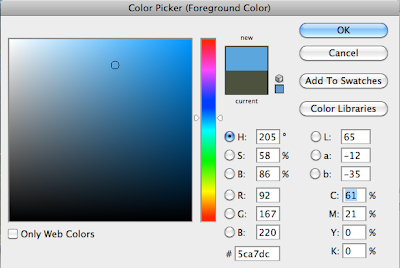
Above - Select Colour Libaries
Above - Then it gives you the unique reference code for Pantone, and can be refered to the Pantone swatch book

Duo tone image
Start off with a greyscale image
Make your you have a good balance under brightness and contrast
Image - Mode - Duotone
Automatic appears when saved as PSD into Indesign
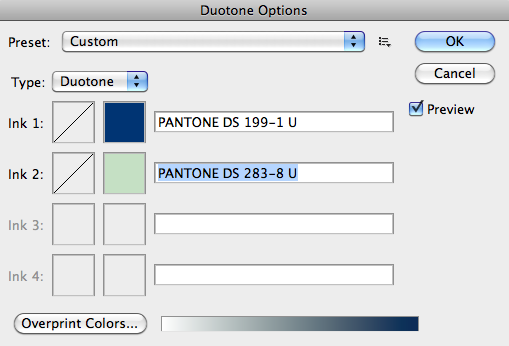
Above - Duotone from Image - Mode. Click on Black to Select a Pantone colour Spot Colour
Above - Use Pantone Process Uncoated for matt stock, and select your spot colour
Above - Select the other colour as well, same method

Above - Duotone
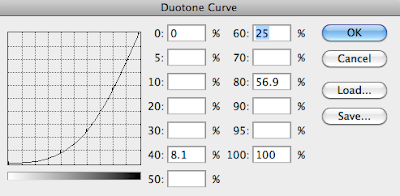
Above - Change the curve under Duotone
Above - The outcome using the Duotone

Under Duotone options you can also choose Tritone and Quadtone for spot colours.

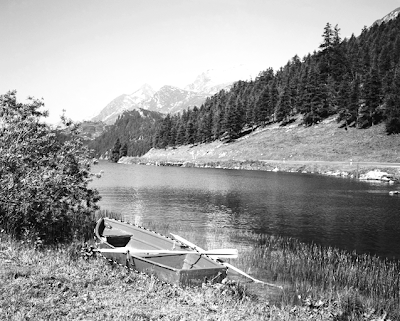
Spot Colour Selected in a selection of area. Boat
Selection - Pen tool
Channels - New Spot Colour
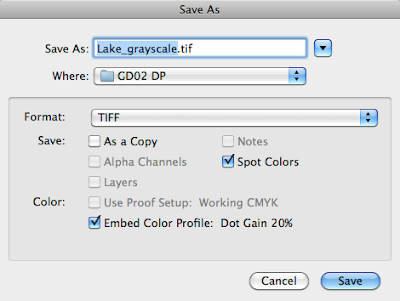
Above - Remember to tick spot colours when saving so can be transfered to Indesign
Above - Make selection of area you want the spot colour to be
Above - Channels - Drop down Menu at side - New Spot Channel
Above - Select and this is what it looks like

Spot Varnish
This is the same way you would create a Spot Varnish as well. But make sure the Pantone colour I select to be the spot varnish isn't used anywhere else in the documents and when at the printers mention that the spot colour pantone 172a is not the pantone 172a colour but instead a varnish.

Terminology

Terminology

CMYK (cyan/magenta/yellow/key black – 4 col process)

This is used in the most common printed process called litho or offset litho

RGB (red/green/blue – screen based)

Greyscale (Black and white continuous tone, any shade of grey such as a black and white photograph)

Duotone (when a continuous tone image is printed in 2 or more spot colours – this term is also generally used when describing tri and quadtones.

Spot colour (one or more specially mixed colours as opposed as a result of a CMYK or RGB mix)

Mono (like greyscale but with a coloured ink, ie:one colour only plus the colour of the material it’s printed on)

Raygun


Product: Raygun (1994)
Art Director: David Carson
Form: Just wider than A4
Function: A music magazine, reviews, interviews, information and advertisements. To be read.
Range: David Carson also produced surf magazines.
Interaction: Easy to read, part of a reading experience, fun and different
Audience: Fans of the genre and culture
Glossy newsprint £2.50 in 1994. Not sure how popular it used to be. Monthly magazine pretty expensive for 1994

Photoshop CS5

RGB vs CMYK
RGB default Photoshop setting, but convert to CMYK to print.

Image - Mode - Change to CMYK to print

RGB
CMYK

After changes from RGB to CMYK the filters cant be applied so start off with CMYK in the first place.
A RGB document is only a third of the size of a CMYK file another reason to use CMYK.

How you know your working with non-printable colours?
View - Gamut Warning - Grey parts are where it wont be able to print so there will be a colour shift

Can change using Brightness/contrast and hue in Adjustments.
Above - CMYK
Above - RGB
Above - Gamut Warning - grey area

Above - bright green colour isn't printable for CMYK
Above - Because of the warning on the top right hand side !
Above - Now the ! has gone it means it is printable with CMYK


How we can use spot colour in Photoshop?

Bach Rescue Pastilles

Above - Open
Above - Closed
Product - Bach Rescue Pastilles
Form - Circular metal tin with a pop out lid
- Cannot be a square shape for the pop out lid to work
Function - Easy to open with one hand
- a screw lid is harder to open and close
- Grabs attention with the pop out lid
Range - Part of a product range, all have consistent packaging, type and colours
Audience - Health store, medics
Interaction - Fun packaging, appealing and stands out on the shelf
Scale - Pocket size. Strong force needed to open the lid so wont spill
Four spot colours.
Beehive Bee Products Honey
Product: Varietal Honey
Process: Flexography
Colours: Spot colour white
Stock: Glass bottle with screw cap plastic or glass
Format: Standard bottle
Finishing: Gloss, varnish to bottle proberly came like this before printed on
Specials: None
Target: Average consumer or honey maybe found at Waitrose though
Cost Band: Budget, The colour of the honey used as the background colour then they just use white as a spot colour
Quantity: Thousands
Competition: Other honey brands, but this stands out because of it's simplicity and easy to see what type of honey you want by the different colour ranges.

Print Production Research

Product: Mondrian
Designer: Jens Anderson & Jonas Forsman

“Wine in a can” makes it simple to bring a glass of wine on the go. Avoid the hassle of wineglasses, opener and fragile bottle. This is a small convenient packaging totally made from aluminum, from which you drink like a glass. The cans are recycled in the same way as conventional aluminum cans.

The contour line give associations to the wine bottle and create good opportunities. Through a restrained color scheme with matte black as the base color and the color of the wine as accents, a feeling of exclusivity which gives the wine justice, is created.

I really like the design of the can however the matt finish does look like a bottle of aftershave.

Process: Flexography

Colours: White,Red and green

Stock: Aluminum

Format: Unique can design different in the market so only made for this certain company

Finishing: None, matt

Specials: None

Target: Classy modern wine drinkers but as it's in a can more accessible than a bottle maybe someone on the move in town?

Cost Band: Exclusive, as the can are only made for this company so it's not a standard can. But they cut back with the colours.

Quantity: Millions

Competition: Other Wines, but the concept of wine in a can stands out in the market but not sure how many and where would use this

Print Production Research


Designed by Amore, Sweden
The design is simple and to the point which makes the communication really clear to understand. I also like the letter I used as a wink.
Process: Flexography
Colours: Black + stock colour for different flavour of cider
Stock: Aluminum Cheap and keeps the cider fresh
Format: Standard Can
Finishing: Black + stock colour may have a varnish finish to it, or maybe the whole can
Specials: Varnish finish
Target: World wide, looks more classy than the average cider can/bottle
Cost band: Cheap as only black + stock colour used
Quantity: Millions a year
Competition other cider drinks but stands out because looks more classy well designed and sits on a shelf next to other alcoholic drinks so they also are competition.

Sunday, 3 October 2010

Colour Gamet

Apple CMY display design could be boon for print production

Graphic designers and photographers know the pain of translating RGB image information on screen into CMYK print on paper. Even with the best understanding of the alchemy of color management, RGB displays and CMYK printing processes simply cannot recreate the same hues and intensities of every color. Apple has filed for a patent on an idea to help those whose bread and butter still involves printing:make the display CMYK.

Diagram: comparing gamuts to CIE color space
Colour Gamet - This diagram compares the gamuts of sRGB, AdobeRGB, CMYK, and Hexachrome to the CIE color space.


Friday, 1 October 2010

Printing Processes 28th September


Studio Seminar 28th September: Print Production
Everything mentioned in the seminar was things that I never knew and I'm glad that the different types of printing methods were explained as the only printing processes I know are at the digital print rooms and screen print. I think the understanding behind print and the processes are important as a Graphic Designer because from this seminar and other workshops there has become a list notes that gives me the extra professional knowledge when considering printing processes. Below are a list of the different printing methods that I learnt about in the seminar:

Lithography
Lithography was developed in 1796 by a Bavarian author Alois Senefelder as a low cost method of mass production printed items. The method consists of 4 etched sheets of metal (Cyan, Magenta, Yellow and Key - Black) rolled using ink and water into rubber rollers then printed onto stock.

Explanation of the Lithography process because I found it hard to explain but I hope this will help.
Old photograph at a Printing firm of the scale that printers come in. They are used for mass production for example newspapers, cards, flyers, letterheads, postcards ect

Rotogravure
Rotogravure was from the 1920's/30's to mass produce items such as photographs cereals boxes, newspapers. The process is similar to the offset lithography however the etched metal sheet is wrapped around a cylinder which prints straight onto the stock. This is good for printing rolls of stock non - stop as the cylinder can keep on printing continuously. It is a CMYK process each colour having it's own etched metal sheet. However it can be used for spot colours as well.

Picture above - Explanation of the process of Rotogravure printing

Picture above - A picture of the Rotogravure printers


Video above - Quick American video to sum up Rotogravure printing

Flexography
Flexography printing is similar to the two above Lithography and Rotogravure printing because they are all rotary printing methods. Instead of using etched metal sheets like Rotogravure printing Flexography uses rubber or plastic sheets instead which means it is more versatile which can be applied to packaging material such food packaging products. It is basically an updated version of letterpress that can be used for printing on almost any type of substrate including plastic, metallic films, cellophane, and paper. It is widely used for printing on the non-porous substrates required for various types of food packaging (it is also well suited for printing large areas of solid color).The ink is controlled in the flexographic printing process by the inking unit. The inking unit can be either of Fountain Roll system or Doctor Blade System. The Fountain roll system is a simple old system yet if there is too much or too little ink this system would likely not control in a good way. The doctor blade inside the Anilox roller uses cell geometry and distribution. These blades insure that the cells are filled with enough ink. It consists of four different stages CMYK each having its own plastic sheet resulting altogether to the final outcome.

A Visual explanation of how the Flexography process works.
Photograph taken from studio workshop - Flexography sheet
Photograph taken from studio workshop - Flexography close-up
Photograph taken from studio workshop - A magnified photograph of the outcome from using the Flexography printing process - Nestle Ice cream food product. Not sure you can make it out from this photo, but you could see where the plastic stock has been pulled away from the Flexography printing cylinder leaving tiny white marks.

In-Line Press: Like the stack press, the in-line press has separate printing units for each color and each unit has its own impression cylinder, but they are arranged in a horizontal configuration just like a rotary offset press. Because of the distance between the printing units, problems with print registration can occur. Tension control equipment is used on the press to hold proper registration between multiple colors. The wider in-line presses are used for printing large items such as corrugated cartons and smaller width webs are used for printing pressure sensitive labels at high speeds.

Stack Press: The stack press has separate printing units stacked vertically and each printing unit has its own impression cylinder. This was the first type of press developed for flexography. It is difficult to hold registration between multiple colors printed on stretchable substrates using the stack press, even with web tension controls. It is best suited for heavier gauge substances, such as thick paper products, that will not stretch or for applications that do not require good registration.

Digital
Digital printing is the latest process of printing and is called digital as it is sent straight from the computer to print. The process is time consuming compared to other printing methods so that is why the mass of prints are usually quite small - 500 flyers example. Digital printers use CMYK but can also include a stock colour. There are two main types of digital printer, Inkjet and Laser printers. Different from most other printing processes the digital printers can be found in most areas which are available to the public.

Above - Diagram explaining Laser print process
Above - Diagram explaining the Inkjet print process
Above-Example of digital printer in action

Screen Printing
Screen Printing a more traditional method of printing but recently has evolved into semi-automatic screen printing machines. The screen printing consists of four layers of CMYK but can be available for spot colours which is popular for designers and artists for more delicate and quality prints.
Above - Quick visual explanation of the Screen printing process
Above- Screens for printing mass quantities to save time-Semi-automatic
Above - Computer Arts Competition -

Design and screen print a T-shirt

Multiple shows you how to create a piece of digital artwork in Illustratorand transfer it to a T-shirt using screen-printing techniques


PAD

Pad printing was originally developed and used in the Swiss watch industry to print watch dials and car instrument dials using manually operated machines with pads made from gelatine, and using slow drying oil based ink. In the late 1960s the process was further developed in Germany with the introduction of silicone rubber pads and mechanical machines; with the help of Wiederhold (now Coates Screen, part of Sun Chemicals) a range of pad printing inks were developed to allow the process to print onto a wide range of products and materials.

Pad printing is an indirect photogravure process. An image is etched into a flat printing plate and ink is flooded and doctored across the surface leaving ink only in the etch. A silicone rubber pad then presses down onto the etched plate and picks up the ink, which due to solvent evaporation has become tacky. The image is now on the surface of the silicone pad. Silicone rubber does not allow ink to penetrate its surface and therefore when the pad presses down onto the product to be printed it releases the ink as a clean film. The range of inks and solvents used enable the inks to adhere to the surface after releasing the ink the pad is then clean and free to repeat the process. Because such a wide range of inks are available almost any material can be printed and due to the flexibility of the silicone rubber pads uneven, curved and awkward shaped surfaces can be printed. As the ink is quick drying, pad printing is capable of 'wet on wet' printing and high quality multicolour designs can easily be achieved including four colour process. The more recent development of closed cup machines has made the process 'cleaner' and enabled the process to become more user friendly and automated. Ideal for printing from the computer onto 3D products.

Above - Diagram explains how the PAD printing process works

Above - PAD Printing Machine

Above- A few golf balls which have been produced using PAD printing process.